SunnyNeo is a Neopets help site. It offers: avatar and fonts help, graphics and tutorials, plot covers, game guides, new rainbow pool, customisation overview, battledome help and more!

Sunny Neo

Key Quest


Keyquest

Shortly after the current beta testing period, Neopets will be releasing an exciting new multiplayer adventure called Key Quest. Currently not much information is available about this new adventure except the following. When more news about Key Quest is available we will let you know.

If you have any new information or have a screenshot of a redeemed code, please neomail iqdragon about it!


Quick links to Neopets pages:
What is Key Quest
Your Collector's Case
Redeem your Key Quest Code
Plushies with codes
Key Quest FAQ


What is Key Quest


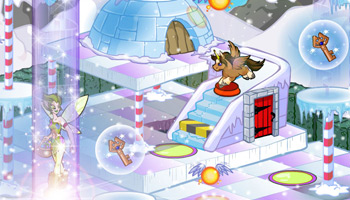
Key Quest is a multiplayer adventure in which you can chat and play together with your friends. Neopets has two images of concept of how the game will probably look like. In the images you can see one of the 56 tokens currently available to play the game with, the Brown Uni.
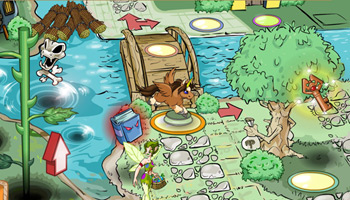


Key Quest - Beta Test


General Info
On the third of July 2008, the Neopets Team released the Key Quest game for beta testing by premium members.

Key Quest is a 3D board game, in which you compete live against other players.

You play as one of the characters in your Key Quest Collectors Case. If you do not have anything in your case, it doesn't matter too much. You will get one for free when you start to play.

The aim of the game is to travel around the board, collecting keys quicker than your opponent. The first player to get the designated amount of keys, and find their way to the 'Quest Door' is the winner. The Quest Door looks like this:


How to Play
You begin your turn by either rolling the dice or playing a power up. If you choose to play a power up, you will still get to roll the dice afterwards. The number of tiles you move is equal to the amount you roll on the dice. If you come to a junction in the board, yellow arrows will pop up. To choose the way that you wish to go, simply click the arrow of the direction.

As you step over the neopoint, key, teleport or powerup tiles, they will activate. To activate all other tiles, you need to land on them.


Game Play
When you start the game, you will be on the outside of a hut. This is called the Game Lobby. Here you can select the length of the game that you want to play, or the chatroom that you want to play in. Once in one of these rooms, it is possible to change your token by clicking your current token in the top left of your screen. Here you may choose any token that you have placed into your Key Quest Quick List in your collectors case. Your list will look something like this:


To the bottom right, you will see the chat module, which allows you to chat with other players. It will look something like this:


Using this chat module, you may talk to other players using pre-set sentences. You may not type your own messages into the box.

If you wish to invite a friend to a game, you can click 'create game' and then 'invite players.' Here, you may invite up to three friends to play a game with you.

When you enter a game, you will be in a waiting room, whilst waiting for other players:


To the left, you can see a door with a keyhole. Once it starts to glow, it becomes clickable. This is used to start a game of keyquest instantly, regardless of how many players are threre.

To the right you can see a plain, brown door. This is the 'exit.' This is always clickable in the waiting room, incase for some reason you need to go, or the game does not load.

When all players have joined, you will be asked to roll a dice. This is for the order of play. Whoever gets the highest score on the dice plays first. Once all players have rolled the dice, players must choose a starting house. The highest roll chooses first. These are the houses that you have to decide between:


After rolling the dice for order, and choosing your house, you will be taken to the game screen. As you can see, there are many tiles in the game that mean many different things:


Tiles
This is the tile from which you start.
This is the tile that gives you a random powerup
This square activates one of the many mini games included within the main game.
This is the teleport square. It will transport you to the other teleport square on the board. This can be useful if you are far away from the Quest Gate, but not so useful if you are close to it. The good thing is that you get to choose whether you go through the teleport or not.
These tiles will give you the coloured key. You will see this message:

This tile gives you points in the game. You get these points as a neopoint reward at the end of the game.
The treasure chest tile will give you one powerup and one key. The fact that you get to choose the key makes it all the more useful.


Houses
The different houses have different advantages and disadvantages. These all depend on where the house is located. At present, there is only one map, so we can only give you details on the houses on that map.


This house is relatively far away from the quest door, meaning that the game will finish later, and it is less likely that you will get there first. However, there are plenty of minigame tiles around it, meaning that you can pick up extra keys. There are also lots neopoint squares around, along with a key square. There is a real possibility of racking up points in this area.


This house is the farthest away from the quest door, however there are three key tiles nearby, as well as powerup, minigame and neopoint tiles. This is a great place to get a decent haul.


This house is very close to the quest door, therefore making it easier to get there quicker. There are also multiple key tiles nearby, along with the teleport, and a few minigames.


This house only has one key nearby, however it is very close to the quest door. It does have lots of powerups nearby, but not many minigames.


Powerups
There are many powerups to be found during the game. These help the person using them, but can severely hinder the person that they are used against. These are the possible powerups:


Rainbow Sticky Hand


This powerup can be very useful to the person using it. They get their pick of the other players' powerups, and they don't have to land on a powerup square. It can be annoying to the person who is on the other end of the powerup, as they permanently loose their powerup.


The Misdirected Compass


This powerup causes the person who it us used on to reverse directions. This is not incredibly useful to the person using it unless someone is getting close to the Quest Door. It is then possible to use it to change their direction, making them come back the way they came. Also, if the person using it wishes to change their direction, perhaps to get somewhere quicker, they can use it on themselves. This can prove to be very useful. It can be a major pain for the player that the compass is used on, because it stops them getting to where they need to go.


The Loaded Gummy Die


The Loaded Gummy Die can be very useful to the user. You basically get to choose what number you get on the next roll. This can be especially useful when close to the Quest Door. This doesn't really do much harm to anyone else, except for the fact that the person using it gets exactly where they want to be.


The Transporter Helmet


The Transporter Helmet can be very useful to the user, if annoying to the person it's being used on. It swaps the person using it with another player of their choice. This can be useful to the person using it, especially if it gets them closer to the Quest Door.


Catapult


This powerup can be extremely irritating to the person that it's used on. It shoots them back 'home,' which is back to where they started. This means that if they were close to the Quest Door, they have to go back around to it. It's a useful tool for stopping people getting there before you.


Bottled Quicksand


This powerup does not give the player using it a major advantage, unless it is a two player game. It causes the chosen player to miss a turn, missing out on any keys or points they may pick up that turn. Bad for obvious reasons.


Key Grabber


The Key Grabber is both extremely helpful to the user and extremely hindering to the person that it is used on. It takes one key from the chosen player, and gives it to the person using the card. This can give a huge advantage to the person using it, as it could be the last key they need to finish the game.


Distraction Potion

We don't have an image of this powerup as yet, but if you see and screenie it, please neomail oobajooba.

The Distraction Potion can be really irritating to the person that it is used on. It allows the user to switch keys with another player, meaning that the person it is used on could end up with a double of one key. It could also be the last key the user needs before winning the game.


Mini games
These mini games will allow the winner to take a key of their choice. This could be the last key needed, or it could be he winner's first key. Either way, the mini games are not to be taken lightly.

Nova Matcher
This game is pretty simple. As the instructions say, you must find identical novas and match them up. You are playing on the same board, at the same time as the other players, and you must compete to get as many pairs as possible in the alotted time. The easiest way to do this is to click without waiting for the matches to disappear. To ensure that the novas that you pick are indeed pairs, you must look at the colour behind the novas, as is said in the instructions:


Spyder Scare
This is one of the more complicated minigames. You have to use your spyder to collect items from the bottom of the screen. You move your spyder at the top of the screen by moving your mouse. You then have to look where the lights from it's eyes are pointing, and wait until they are pointing towards the item that you wish to pick up. Once you are ready to pick up the item, you can do so with a click of your mouse. It doesn't matter where your pointer is located.


Petpetpet Snare
In this minigame, you must capture the designated petpetpets in a loop, by drawing with your mouse. You just click and drag to make a line. As with all the minigames, you are playing on the same board, and at the same time as the other players. The petpet that you need to snare in the top right of the screen.


If you win a mini game, and choose a key, this will come up on your screen:


Prizes
With every game, you get the neopoint prize from the minigames and neopoint tiles, as well as a key (gold, silver, bronze or lead depending on how well you preformed in the game). The key can be traded in at the Keyquest Vault for a prize, you can get codestones, neggs, books, stamps, furniture, wearables and many other items for it. The neopoint award is pretty high as well, you should expect 1,000 to 2,500 neopoints per game. You will be rewarded your neopoints even if you have not won. The maximum number of neopoints you can win is currently unknown. Guessed limits are at 25k a day, and 10 keys a day. Below you can see an overview of the Vault and of the collected keys that are shown on your Keyquest Stats page.


You carefully insert the gold key into the lock and turn it. The door slowly opens to reveal... A GIANT MEEPIT!
No, wait, that isn't a Meepit -- it's your prizes. Enjoy!

Your received the following prizes:

  • Main Codestone
  • Orn Codestone
  • Ogrin Survivor
  • Orange Draik Stamp


If you trade a gold key you receive 4 items, a silver key is worth 3 items, a bronze key 2 items and a lead key 1 item. Click here to go to see the Key Quest Beta Prizes.


Key Quest Mini Games


The Neopets Keyquest page was updated on July 24th with a spiffy overview of all the mini games that will be released in the actual game (more than there are in the current beta). Below you can see an overview.


Hopscotch

Fruit Picker

Petpet Wash

Claw Game

Poogle Race

Match Game


Key Quest Tokens


To play Key Quest you'll need to have collected one or more of the Key Quest tokens. With these tokens you will be able to explore the Key Quest world. You can collect a token either by redeeming a virtual Key Quest code or participating in events on the Neopets site, it is not known what events those will be. As stated in the Editorial Issue 328, everyone will be able to play Key Quest without having to purchase merchandise.

There is an overview of all tokens further down the page.

I just read and saw on Neopets that you are going to be creating Key Quest. Apparently, you get the Keycodes off of merchandise and then you can play the game. You are not going to get rid of the site as we know it now, are you? I hope this will just be a new game in the Games Room. ~princezuda
This must be rumour day. No, we're not going to replace the site we've spent nearly a decade building up with a single game. :) We have no idea how people jumped to this conclusion. We have a page about Keyquest here. Also, as stated on the page you will not be forced to purchase merchandise in order to play. Please forgive any 404s linked to the info page; we're still in early beta and it is a work in progress.

This is question 5105, archived from Editorial Issue 328.


According to one anonymous staff member, the tokens that you collect may affect your game, and how well you do in it:


Each token has an 'alignment' which is either Earth, Air, Water, Fire, Light or Dark. As yet, there is not much information on what these will do besides that which the anonymous staff member has given.

Key Quest codes


Thanks to ann326 and mysticalnyte we now know a 5 inch plushie indeed contains a Key Quest Code for the corresponding neopet token. They also provided us with screenshots of redeeming their Key Quest codes.
See the following screenshots of redeeming a Gold Gelert Plushie code.

Redeemed Key Quest Prize

See the following links to see others screenshots of redeeming codes. We don't need all the redeems possible, these are just a few screenshots of some redeems.
Plushie Wocky Starry Grundo
Plushie Mynci Gold Shoyru
Brown Uni Gold Gelert
Cloud Kougra Pink Bruce
Plushie Jubjub Yellow Kacheek
Red Scorchio Speckled Acara
Striped Cybunny


Merchandise related to Key Quest


Neopets has released a new line of Plushies and are for sale at a Target store near you.


Also a new set of Trading cards will be released which will also contain Key Quest codes, like a code for one of the following Key Quest Tokens: "The Darkest Faerie", "Jeran", "Princess Amira".


Your User Lookup


On the 1st of February Neopets updated everyones User Lookup to contain how many Key Quest Token's people have collected. Other icons on your lookup have also been updated.

Some people have noticed that their lookup shows "Key Quest Tokens: 1 (1 unique)" but haven't redeemed a prize code. This is a glitch on Neopets part, visiting your Collector's Case will reset the count to the correct value of 0 (0 unique) since there are no tokens in there.


Your Collector's Case


Here you can see all the tokens you have collected. You can also change the access to your case so that only you, your neofriends and you, or everyone can see them. In the preferences screen you can also change the skin colour of your Collector's Case. The case also has a Favourites and Quick List icon, which are explained by the Help icon.

Help Dialog


The Key Quest collector's case holds all of your Key Quest game tokens! The tokens are stored in collections, which are housed in the categories on the left. Click a category, and then browse the collections using the navigation at the top of the case. Tokens you have acquired will be displayed in full colour. Tokens you have yet to acquire will be shadowed. Tokens that are not yet released will be displayed as question marks. (There may even be additional special tokens, so be sure to keep an eye out!)

If you'd like to see more information about a specific token, click on or hold the cursor over that token. A box will pop up displaying the character's name, the token's alignment, where to get the token and other tidbits of information. If you want to add a token to your favourites or Key Quest quick list, you can do that from the info box as well. Just select the appropriate options!

If you'd like to see your favourites or quick list, set your collector's case preferences, or if you need help, you can use the following buttons:

Favourites Clicking this icon displays the twelve tokens you've chosen as your favourites! You can remove tokens at any time to replace them with new favourites.
Quick List Clicking this icon displays the twelve tokens you've chosen to use in your Key Quest quick list. You will have access to these twelve tokens when joining a Key Quest game.
Preferences Clicking this icon displays your collector's case preferences. Here, you can select your collector's case theme or choose your privacy settings.
Help Clicking this icon displays this help dialog, which you've already figured out.


Tokens


Due to a glitch we saw a full Collector's Case of tokens instead of an empty one, therefore we can grant you a sneak preview of all the current 18 tokens.


Neopets Tokens Page 1

Neopets Tokens Page 2

Faeries Tokens

Heroes Tokens


In adition to collection 1 above, there are now two new collections, a table of which can be seen below:

Tokens


Blue Bruce Token


Blue Chomby Token


Blue Elephante Token


Brown Uni Token


Camouflage Poogle Token


Cloud Kougra Token


Cloud Meerca Token


Cloud Uni Token


Dark Nova Token


Electric Cybunny Token


Electric Gelert Token


Electric Shoyru Token


Electric Wocky Token


Faerie Acara Token


Faerie Aisha Token


Faerie Ixi Token


Gold Aisha Limited Edition Token


Gold Gelert Limited Edition Token


Gold Shoyru Limited Edition Token


Green Cybunny Token


Green Kacheek Token


Green Shoyru Token


Halloween Acara Token


Halloween Jubjub Token


Halloween Kacheek Token


Island Bruce Token


Island Jubjub Token


Island Kacheek Token


Jeran Token


Nova Token


Orange Aisha Token


Orange Kougra Token


Orange Meerca Token


Pink Bruce Token


Pink Cybunny Token


Pink Korbat Token


Pink Quiggle Token


Plushie Jubjub Token


Plushie Mynci Token

Plushie Wocky Token


Princess Amira Token


Purple Kau Token


Purple Scorchio Token


Rainbow Blumaroo Token


Rainbow Chomby Token


Rainbow Wocky Token


Red Ixi Token


Red Meerca Token


Red Scorchio Token


Silver Aisha Limited Edition Token


Silver Gelert Limited Edition Token


Silver Shoyru Limited Edition Token


Speckled Acara Token


Speckled Bruce Token


Speckled Elephante Token


Speckled Kiko Token


Speckled Quiggle Token


Speckled Uni Token


Split Grundo Token


Spotted Kau Token


Spotted Mynci Token


Starry Elephante Token


Starry Grundo Token


Strawberry Jubjub Token


Strawberry Poogle Token


Strawberry Usul Token


Striped Cybunny Token


Striped Usul Token

Striped Xweetok Token


Supernova Token


The Darkest Faerie Token


Ultranova Token


Yellow Flotsam Token


Yellow Kacheek Token


Yellow Kougra Token


Yellow Poogle Token


Yellow Xweetok Token


There has also been a secret token discovered, a jelly jubjub. It can be found by going into collection three, and clicking on the empty space in the bottom right corner You will see this:


Copyright 2008 Neopets, Inc. All Rights Reserved. Used With Permission
Content © 2008 the SunnyNeo.com team